

Metriport provides tools to transform your data for analytics and pipe it into warehouses like Snowflake, Redshift,
BigQuery, and more - enabling you to do population level analytics on your patient data.
There are two primary ways to perform analytics on your patient population data: Managed and Manual.
Managed: Snowflake Data Warehouse
Metriport offers direct integration with Snowflake, allowing you to analyze your patient data in a powerful, scalable cloud data warehouse. This approach provides:- Managed data transformation: Metriport does the heavy lifting to get your data into an analytics ready data warehouse 🎉
- Near Real-time Analytics: Query your patient data right after it’s processed
- Scalable Performance: Leverage Snowflake’s elastic compute resources for complex analytics
- Secure Data Sharing: Use Snowflake’s
Secure Data Sharingfeature for secure data collaboration
Setting Up Snowflake Integration
-
Create a Snowflake Account: Sign up for a
Business Critical Edition
Snowflake account and share your account identification with us:
- View account details:
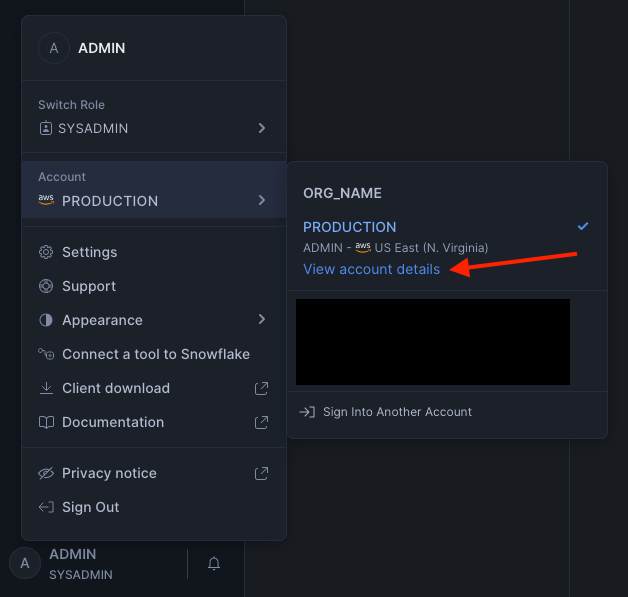
- Copy these fields and share them with your Metriport account manager:
- Organization Name
- Account Name
- Account Locator
- Cloud Provider (AWS, Azure, GCP)
- Region
- View account details:
-
Access the data: Metriport will share your patients’ medical data with your Snowflake instance:
- It uses Snowflake’s Secure Data Sharing for secure, compliant, and zero-copy data sharing between Metriport and your Snowflake account.
- Data will be visible through Secure Views, one for each resource type.
Manual: Tuva Data Model
To accomplish this, we standardize our data into the Tuva data model - another open source project that focuses on making healthcare data more standardized for analytics. The Tuva approach provides:- Open Source: Transparent, community-driven data modeling
- Healthcare-Specific Metrics: Built-in calculations for common healthcare KPIs
- Multi-Warehouse Support: Works with Snowflake, BigQuery, Redshift, and other warehouses
Schema Documentation
The Metriport data model consists of a normalzied FHIR schema along with computed columns to ease querying complexity. Each table is designed to capture specific information in a standardized format for analytics. Thedata_source_ext column contains the source identifier from the FHIR
Data Source extension. See that page for the source values.
See Core tables by resource for an index of all core tables grouped by main resource type.
Core Tables
- AllergyIntolerance - Patient allergies and intolerances, with reaction and manifestation detail tables
- Binary - Binary content (e.g., documents, images) referenced by the system
- CarePlan - Patient care plans and activities
- Communication - Communications (e.g., messages, notifications) associated with the patient
- Composition - Clinical documents (e.g., discharge summary) with sections, attestation, and events
- Condition - Symptoms, problems, complaints, and diagnoses reported during encounters
- Consent - Patient consent and provision/category codings
- Coverage - Insurance and payment coverage
- Device - Devices (e.g., implants, equipment) with optional version detail
- DiagnosticReport - Diagnostic reports containing test results and clinical findings
- DocumentReference - References to clinical documents and their content/attachments
- Encounter - Unique patient interactions with the healthcare system
- FamilyMemberHistory - Family member history and conditions
- Goal - Patient goals and targets
- Immunization - Vaccines administered to patients
- Location - Practice and facility locations where care is provided
- Medication - Medications ordered or administered during encounters
- MedicationAdministration - Records of medications actually administered to patients
- MedicationDispense - Records of medications dispensed to patients
- MedicationRequest - Medication orders and prescriptions
- MedicationStatement - Patient-reported medication information (with dosage table)
- Observation - Clinical measurements like blood pressure, height, and weight (with reference range table)
- Organization - Healthcare organizations and facilities
- Patient - Patient demographic information and core patient data
- Practitioner - Healthcare providers who deliver care
- Procedure - Procedures performed on patients
- ServiceRequest - Orders and referrals for procedures, labs, or other services