> ## Documentation Index
> Fetch the complete documentation index at: https://docs.metriport.com/llms.txt
> Use this file to discover all available pages before exploring further.
# AI Summaries
> Get a brief summary of the most relevant medical history you need to know about your patient
This feature summarizes your lengthiest patient records into one cohesive paragraph consisting of the most relevant medical history you need to know about your patient - retrievable via the API or dashboard.
This is a premium feature - if you'd like access to it,
contact us and let us know!
## API
When using the API, you can access the AI brief by triggering a
[Consolidated Data Query](/medical-api/api-reference/fhir/consolidated-data-query-post) request.
Depending on the `conversionType` you choose, the AI brief will be included in the response in a
different format (see [FHIR Bundle](/medical-api/handling-data/ai-summaries#fhir-bundle) or
[Medical Record Summary](/medical-api/handling-data/ai-summaries#medical-record-summary) below).
If you add a resource type filter to the `Consolidated
Data Query`, make sure to include `Binary` as well in
order to get the AI Brief in the results.
### FHIR Bundle
When triggering a consolidated query via the API with the `conversionType` query param set to `json`,
the AI brief will be included in the response under a
[Binary resource](/medical-api/fhir/resources/binary) with the following format:
The `data` field is a Base64 encoded string containing the
AI brief text.
```json theme={null}
{
"resourceType": "Binary",
"id": "1234",
"meta": {
"versionId": "1",
"lastUpdated": "2023-06-14T10:30:00Z",
"source": "metriport:ai-generated-brief"
},
"contentType": "text/plain",
"data": "VGhlIHBhdGllbnQgaXMgYSA0Mi15ZWFyLW9sZCBtYWxlIHdobyBpcyBjdXJyZW50bHkgb24g
bXVsdGlwbGUgbWVkaWNhdGlvbnMgdG8gbWFuYWdlCnZhcmlvdXMgY29uZGl0aW9ucy4gSGlz
IG1lZGljYXRpb24gcmVnaW1lbiBpbmNsdWRlcyB6b2xwaWRlbSAxMCBtZyBmb3Igc2xlZXAs
IHNpbXZhc3RhdGluCjIwIG1nIGZvciBjaG9sZXN0ZXJvbCBtYW5hZ2VtZW50LCBsZXZvdGh5
cm94aW5lIHNvZGl1bSAwLjA3NSBtZyAoU3ludGhyb2lkKSBmb3IgdGh5cm9pZApyZXBsYWNl
bWVudCB0aGVyYXB5LCBhbmQgemFmaXJsdWthc3QgMjAgbWcgKEFjY29sYXRlKSBmb3IgYXN0
aG1hIG1hbmFnZW1lbnQuIFRoZQpjb21iaW5hdGlvbiBvZiB0aGVzZSBtZWRpY2F0aW9ucyBz
dWdnZXN0cyB0aGUgcGF0aWVudCBoYXMgY29uY3VycmVudCBjb25kaXRpb25zCmluY2x1ZGlu
ZyBzbGVlcCBkaXN0dXJiYW5jZSwgaHlwZXJjaG9sZXN0ZXJvbGVtaWEsIGh5cG90aHlyb2lk
aXNtLCBhbmQgYXN0aG1hIG9yIG90aGVyCnJlc3BpcmF0b3J5IGlzc3VlcyByZXF1aXJpbmcg
YSBsZXVrb3RyaWVuZSBtb2RpZmllci4="
}
```
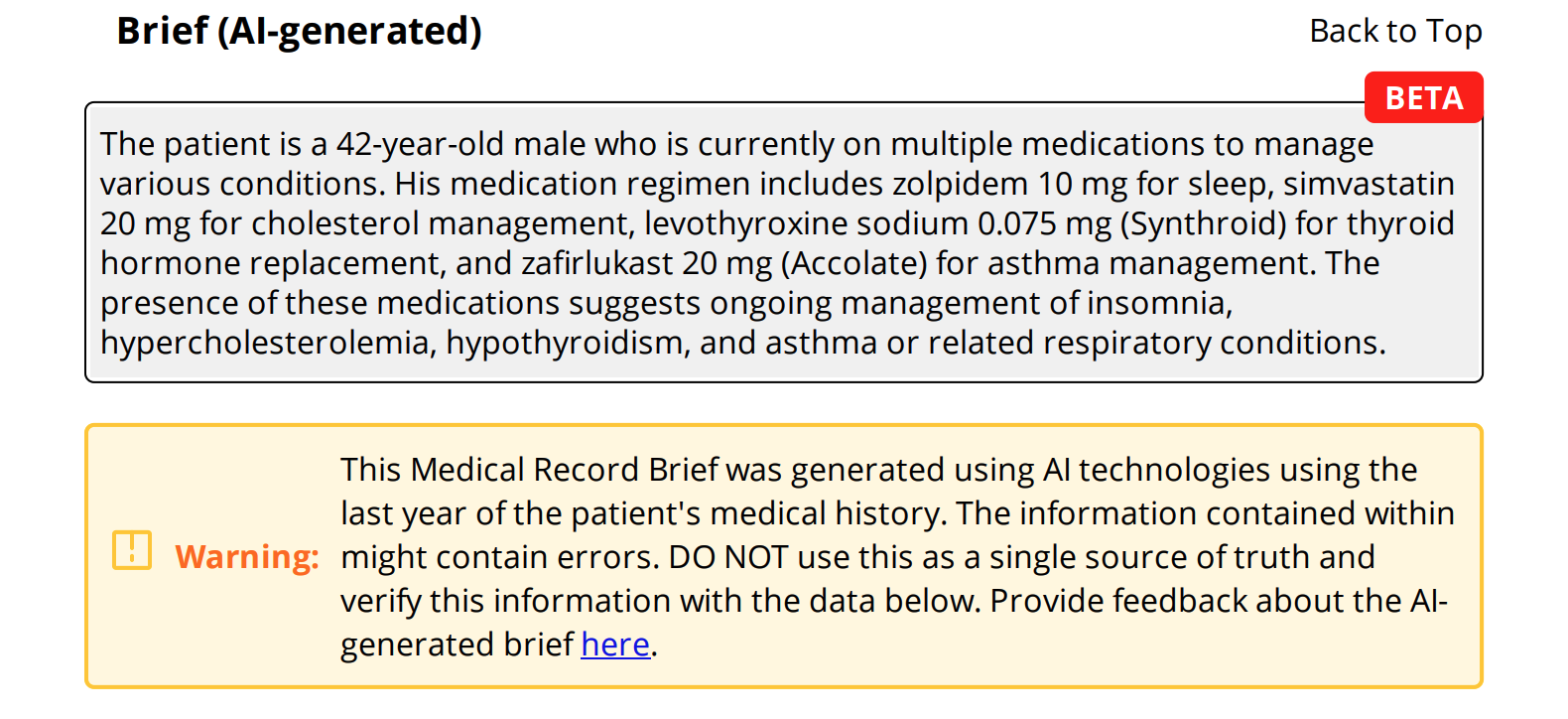
### Medical Record Summary
When triggering a consolidated query via the API with the `conversionType` query param set to
`html` or `pdf`, the AI brief appears
at the top of the Medical Record Summary document.
 ## Dashboard
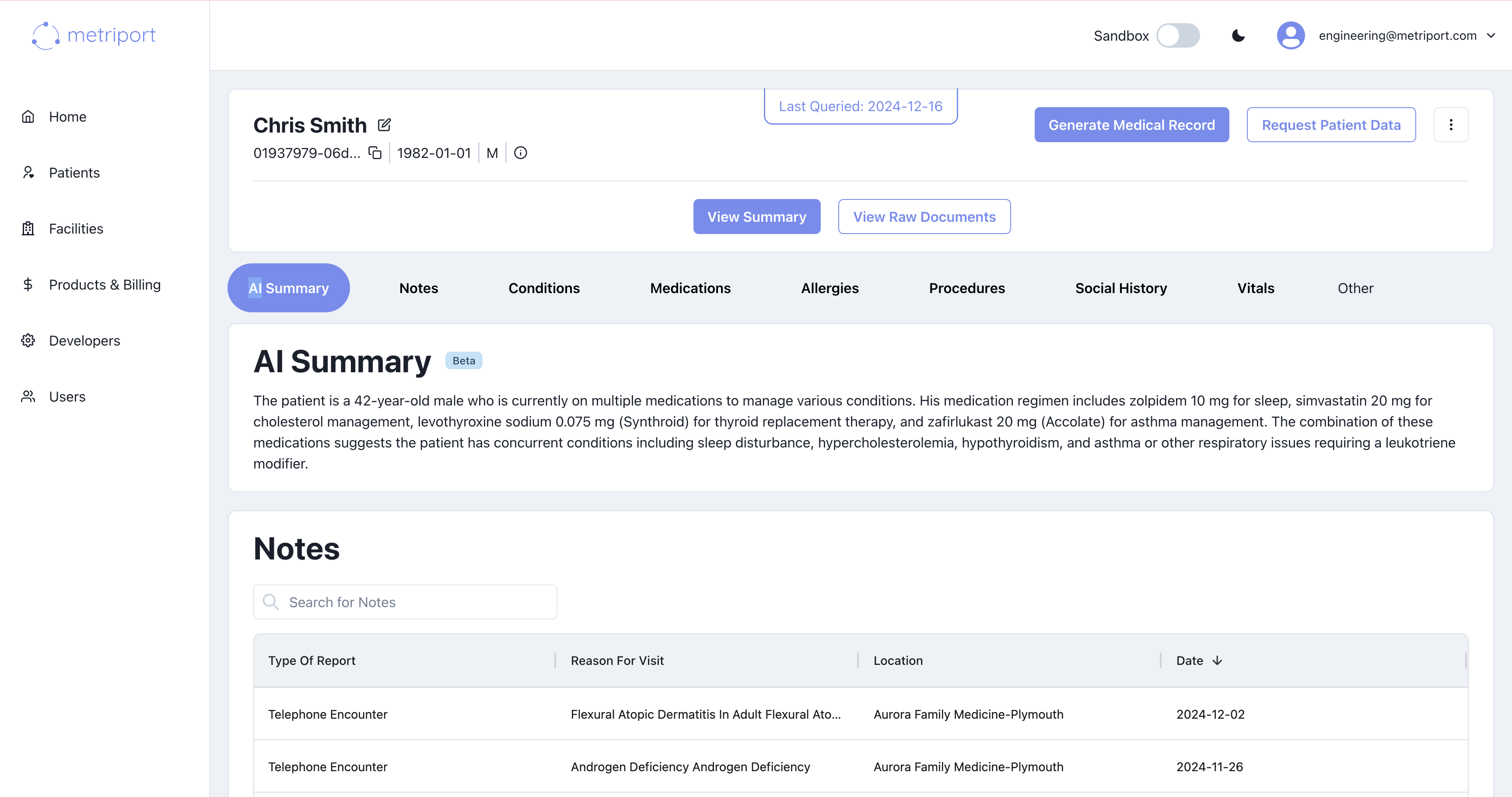
Once a patient's data is loaded in the Metriport dashboard, you can view their AI brief at the
top of their medical record history.
## Dashboard
Once a patient's data is loaded in the Metriport dashboard, you can view their AI brief at the
top of their medical record history.
 ## Data Warehouse
AI summaries are available in the data warehouse under the [`Binary`](/medical-api/handling-data/schema-v100/binary) resource table. The AI brief text is stored as Base64-encoded data in the `data` column, and can be identified by the `meta_source` field which contains `"metriport:ai-generated-brief"`.
The `data` field contains Base64-encoded text. You'll need
to decode it to retrieve the AI brief content.
## Data Warehouse
AI summaries are available in the data warehouse under the [`Binary`](/medical-api/handling-data/schema-v100/binary) resource table. The AI brief text is stored as Base64-encoded data in the `data` column, and can be identified by the `meta_source` field which contains `"metriport:ai-generated-brief"`.
The `data` field contains Base64-encoded text. You'll need
to decode it to retrieve the AI brief content.